Skip to content
FundEasy
Features

Everything FundEasy does, in one place

Events and registration, giving pages, crowdfunding, peer-to-peer, recurring giving, live check-in, and the reporting that ties it together. Built with and for faith-based nonprofits.

Events
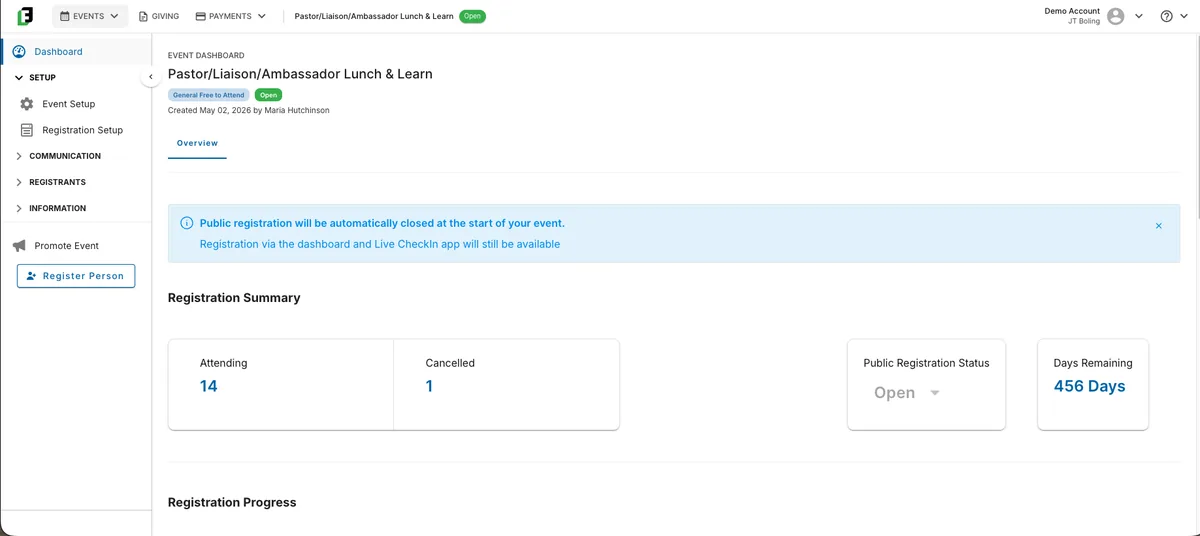
The event dashboard, showing the registration summary with attending and cancelled counts and the days remaining.
Giving
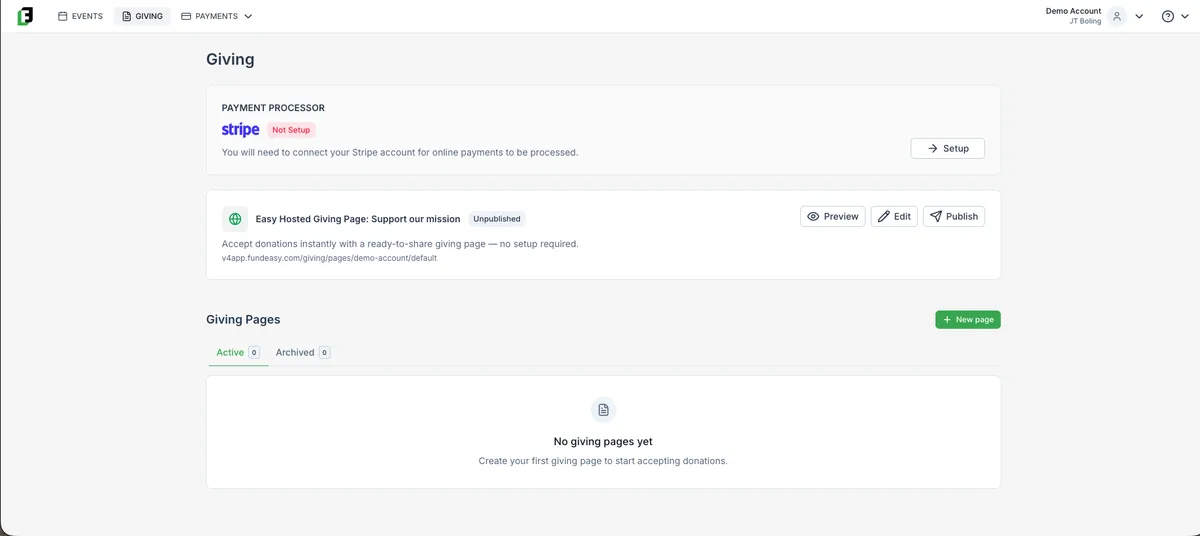
The Giving module, showing the payment processor status, the hosted giving page, and the list of giving pages.
Seating
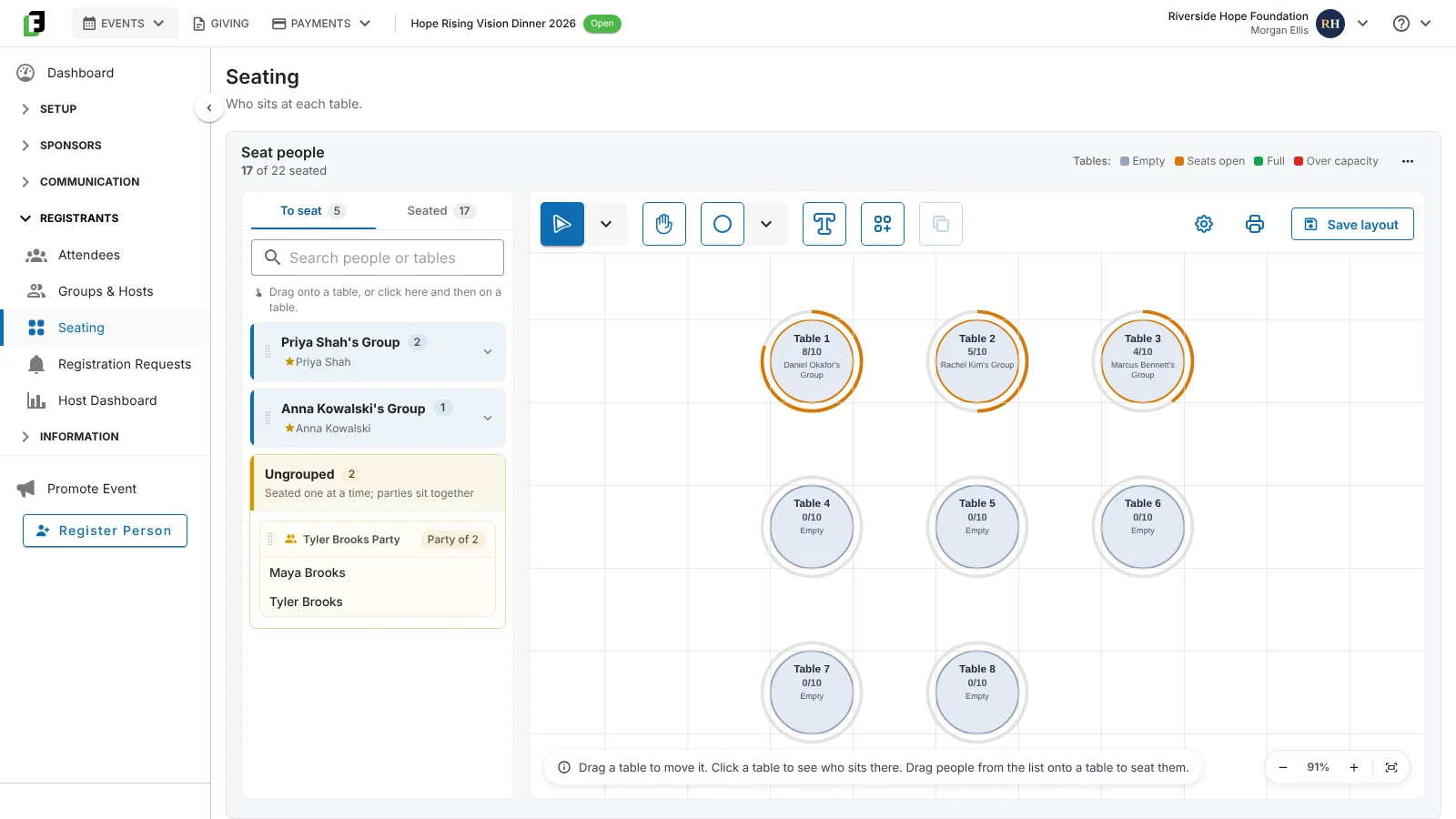
Seating with three host groups placed at tables and one ungrouped party still waiting in the To seat list.
The short answer

What does FundEasy do?

FundEasy is fundraising software for faith-based nonprofits, ministries, Christian schools, and pregnancy resource centers. It brings four things into one platform.

Events and Attendance runs registration for banquets, galas, dinners, and walks, with table hosts on events built from the Vision Dinner template, sponsors, Seating, and live check-in on iPhones and iPads. Attendees, Groups & Hosts, and Seating share one guest list. Giving Pages runs online giving, from an everyday donation page to segmented appeals and goal-based campaigns, with progress and donor metrics shown while a campaign is live.

Peer-to-Peer turns supporters into fundraisers with their own pages, teams, leaderboards, and pledges. Recurring Giving runs underneath all of it, so a one-time donor can become a monthly one.

Cash, check, and wire gifts are recorded alongside online gifts so totals stay accurate, and reporting covers attendee rosters, meal counts, sponsors, hosts, transactions, and payouts. We don't charge any fees for offline gifts.

How the platform is organized

Four modules

You set up the event or the giving campaign for the night or the appeal you are running.

There are four modules. Events and Attendance runs anything with a registration and a door. Giving Pages runs online giving, from your everyday donation page to a goal-based campaign. Peer-to-Peer turns supporters into fundraisers with their own pages. Recurring Giving runs underneath all of it, so a one-time gift can become a monthly one.

Events and Attendance

Registration, sponsors, seating, and live check-in for banquets, vision dinners, walks, and golf outings.

Giving Pages

Easy giving page, hosted pages, crowdfunding, baby bottle campaigns, birthday fundraisers, or a blank canvas.

Peer-to-Peer

Participant pages, teams, pledges, leaderboards, and goal meters, tied to an event or standing on their own.

Recurring Giving

On every giving page by default. Your team can update or cancel a monthly gift for a donor in a few clicks.

Everything above shares one contact list, one payments ledger, and one set of reports. That is the part a stack of separate tools cannot do.

Event features

Events & Attendance

Registration and event management for banquets, galas, dinners, walks, and anything else with a guest list.

  • Run every kind of event, from banquets and vision dinners to walks and golf outings.
  • Attendees, Groups & Hosts, and Seating share one guest list. A change on one screen updates the other two. The capacity bar shows named attendees, names needed, and available capacity.
  • A setup wizard for dates, venue with a public map, attendance goal, and capacity that closes registration on its own.
  • Registration types you control, with a form builder for required fields, meal choices with quantity caps, and custom questions.
  • Sponsors who complete their own form for your approval, with tiers shown on the public page.
  • Duplicate an event to run it again next year, and archive the ones you are done with.
See how events and attendance work

Live Check-in

Run the door on iPhones and iPads, and see who attended on your dashboard once you upload after the event.

  • Available on every event.
  • The Check-in Hub requires an iPad. Check guests in on iPhones or iPads.
  • An attendance breakdown on the event dashboard after you upload from the Hub.
  • Name tags and labels from a step-by-step wizard, printed in order by table or by last name.
  • An attendee roster afterward that reflects who actually showed up, not just who registered.
See how live check-in works

Table Hosts

The volunteers who fill your tables, and a way to see how they are doing before the week of the event.

  • On events built from the Vision Dinner template, guests choose their host from a dropdown when they register, so every registration is attributed.
  • Make anyone a host in one click. A group can have no host, one host, or several. Remove a host and their group stays together.
  • Host Instructions emails you can edit and resend.
  • A group is a flexible way to organize your attendees, often a host and the guests they bring. Groups & Hosts shows guests by group in Board and List views, with anyone not in a group under Ungrouped. On other events the screen is called Groups.
  • A Host Dashboard showing each host’s invited and registered counts at a glance, on events built from the Vision Dinner template.
See how table hosts work

Want to see the event side running end to end? Book a demo.

Giving features

Giving Pages

Your online giving, from the everyday donation page to a campaign with a goal and a deadline.

  • Every account comes with an Easy Giving Page, your default donation page.
  • Hosted pages for general fund giving, monthly giving programs, time-bound campaigns, and segmented appeals.
  • Giving page templates: Crowdfunding, Baby Bottle Campaign, Birthday Fundraiser, and Start from Scratch.
  • Progress, one-time gifts, recurring gifts, new donors, and recurring donors at the top of every page while the campaign is live.
  • Custom banner and brand colour, an embedded YouTube or Vimeo video, and automated tax receipts.
See how giving pages work

Crowdfunding

One page, one goal, one number everybody can watch climb.

  • A goal-based campaign page with an optional progress meter and leaderboard.
  • Set a deadline, or leave it open.
  • Pledges and offline gifts count in the total alongside online gifts. We don't charge any fees for offline gifts.
  • Recurring giving available, so a campaign donor can become a monthly donor.
  • Embedded video and your own branding.
See how crowdfunding works

Peer-to-Peer

Your supporters raise money on your behalf, each with their own page.

  • Every participant gets a personal fundraising page with a goal and their own story.
  • Participants set their own page title, banner image, and message, and can embed a video.
  • Teams, so a church, a class, a family, or a department fundraises together while individual effort still shows.
  • Pledges to track what has been promised and not yet paid, plus optional leaderboards and goal meters.
  • Invite participants with a magic-link email, so nobody creates an account or remembers a password. All they need is their email.
See how peer-to-peer works

Recurring Giving

Monthly gifts, offered at the moment someone is already giving.

  • Available on every giving page, so recurring is an option at the moment someone gives.
  • A Donor Portal for donor self-service is coming. Today your team makes changes.
  • Admins can edit the amount or cancel on a donor’s behalf.
  • A monthly giving program can live on its own hosted page.
  • Recurring gifts and recurring donor counts show in every giving page’s summary metrics.
See how recurring giving works

Want to see how a campaign and an event share the same donor records? Book a demo.

Email and reporting features

Email Reminders

The emails around your event, scheduled ahead or sent when something happens.

  • Compose an email to a group or one person, preview it, then send it, save it as a draft, or schedule it for later.
  • See everything sent, drafted, and scheduled, and open View Recipients on any sent email to confirm exactly who got it.
  • Invitation lists that track imported, invited, registered, and declined, with resends and follow-ups.
  • Automatic registration confirmation and cancellation emails, and coordinator notifications when someone registers.
  • Guest Confirmation and Host Instructions templates you can edit, with a preview of every email an event sends.
See how event email works

Reporting

The numbers you need while something is running, and the ones you need once it is over.

  • Six built-in event reports: Event Summary, Simple Attendee Roster, Meal Choice Report, Affiliation Summary, Groups and Hosts, and Event Sponsor Summary.
  • Saved and custom reports, plus CSV export from everywhere.
  • Live summary metrics on every giving page while a campaign is running.
  • Payments and payouts visibility, with payouts tied back to the transactions behind them.
See how reporting works

Want to see the reports with your own event in them? Book a demo.

See how it works for an event like yours

Tell us about the event or campaign closest on your calendar. In thirty minutes we’ll walk you through FundEasy with it in mind.

Book a Demo
The one comparison nobody explains

What is the difference between giving pages, crowdfunding, and peer-to-peer?

The four ways money comes in, compared. Optional means the feature is available and you switch it on when you need it.
Giving Page Crowdfunding Peer-to-Peer Event
Who asks You You Your supporters You
Who builds pages You You You build the parent, supporters build their own You
Has a goal and a deadline No Optional Yes Registration dates
Individual fundraiser pages No No Yes Via peer-to-peer
Teams No No Yes Yes, on Peer-to-Peer Events
Registration and a guest list No No No Yes
Live check-in No No No Yes
Recurring giving Yes Yes Yes Not applicable

Most organizations use several of these in a year. They all run in the same account, with the same contact records and the same reporting behind them.

Not sure which of these fits what you are planning? That is most of a demo conversation. Book a demo.

Where these features do the work

The nights and campaigns they add up to

Questions

Platform questions

Already a customer checking whether something exists? These are the answers we give most often.

What does FundEasy do?

FundEasy is fundraising software for faith-based nonprofits, ministries, Christian schools, and pregnancy resource centers. Events and Attendance runs registration for banquets, galas, dinners, and walks, with table hosts, sponsors, seating, and live check-in. Giving Pages runs online giving, from an everyday donation page to segmented appeals and goal-based campaigns. Peer-to-Peer turns supporters into fundraisers with their own pages and teams. Recurring Giving runs underneath all of it. Cash, check, and wire gifts are recorded alongside online gifts, and reporting covers rosters, meal counts, sponsors, hosts, transactions, and payouts.

What is the difference between a giving page, crowdfunding, and peer-to-peer?

A giving page is where you ask and a donor gives, with no goal or deadline needed. Crowdfunding is the same act with a visible goal, an optional progress meter and leaderboard, and usually a deadline. Peer-to-peer changes who does the asking: your supporters each get their own fundraising page, can form teams, and share with people you have no way to reach yourself. An event adds a registration and a guest list on top, which is what makes check-in and seating possible.

Can we run events and online giving in the same account?

Yes, and that is the point of the platform. Events, giving pages, crowdfunding, peer-to-peer, and recurring giving all run in one account with shared contact records and reporting. A guest you meet at the spring banquet is the same record you write to in December, and offline gifts recorded during either one land in the same totals. We don't charge any fees for offline gifts.

Does FundEasy keep donor records?

FundEasy keeps contacts, gifts, registrations, and reporting with the same person across every event and giving page. Reports, gifts, and registrations export to CSV when you want them in a spreadsheet.

What does check-in run on?

One iPad runs the Hub. Volunteers check guests in on iPhones or iPads, and someone on an iPad in Guest Manager mode handles walk-ins and changes. Check-in is available with every event, and after you upload check-in data from the Hub, the attendance breakdown shows on your event dashboard.

How many events can we run?

As many as you need. Events are unlimited on every plan, so adding a spring walk to a fall banquet, or a second dinner in another city, doesn't change your plan. Each event keeps its own registration, guest list, and reports. You can duplicate last year's event to start the next one from what you already built.

What does it cost?

FundEasy is $1,500 a year, or $150 a month, on a one-year term. Pregnancy centers are $999 a year, or $100 a month. Every plan includes events, giving pages, crowdfunding, peer-to-peer, and recurring giving, with unlimited events. On online transactions, FundEasy charges a 0.7% platform fee, and Stripe's processing fee is separate under your own Stripe agreement. Donors can choose to cover processing fees on your giving pages. See pricing or book a demo.